AI Appointment Scheduling: How Voice Agents Automate Bookings and Reminders
- By Deepak Dutta
- 11 min read
Table of Contents
Key Takeaways
- Target gaps automation handles best. Peak-hour holds, after-hours calls, reminder follow-up, unfilled cancellations.
- Automate four core workflows. Booking, confirmation, rescheduling, and reminders cover most scheduling volume.
- Define the escalation boundary before launch. AI schedules; it never diagnoses, triages, or advises.
- Write access to calendars is non-negotiable. Read-only agents create extra work for staff.
- Reminders work when timing and channel align. Phone calls outperform text alone for attendance.
- Confirm data protection terms before signing. Ask for agreements, audit logs, encryption, and retention rules.
Introduction
Every empty appointment slot costs a business money, and every ringing phone costs front-desk time. Hours are wasted in your clinic, salon, home service company, or office staff taking calls to book, reschedule, and reminder calls to follow a few known patterns, while calls missed outside of working hours go unanswered. The trick is repetition, which is why AI appointment scheduling has gone from pilot testing to service utility. A voice agent is capable of filling any slot, providing appointment confirmation information at any time without recourse to any human context, and even canceling and replacing appointments to cancel slots without reference to anything but live availability.
What it cannot do is exercise judgment that requires human context. This guide covers the role of AI, where to draw the escalation line, how to design the booking workflow, and regulatory requirements. It is for business owners and operations leaders who want to efficiently and effectively schedule and who want to reap the benefits with minimal risk. It also identifies the gaps in evidence.
Why Appointment Scheduling Is Ripe for AI Automation
Scheduling is an area of rules and well-defined parameters that lends itself to automation. Missed appointments spread like wildfire in health care. No-shows and empty appointments cost the United States $150 billion per year, with base rates of over 30 percent (a vendor report by Healthcare Finance News summary). The numbers are rounded, as the report is a few years old and vendor-published. But the trend is true in all settings: Every missed, unfilled, or ignored reminder is lost revenue.
A more recent benchmark comes from Penn Medicine's 2026 randomized trial, published in NEJM Catalyst. Among nearly 60,000 high-risk patients, the baseline no-show rate was 11.3 percent, and adding an automated interactive voice call to existing text reminders reduced it to 9.6 percent. This effect persisted for 6 months on 244,000 patients. These are large numbers, and even with a slight reduction in no-shows, there's a massive recovery of capacity. It is relevant for professional practices, salons, and home services.
Three pressures make the case for automated appointment scheduling across industries. Most service-based organizations still use phone appointments, which hold up employees during peak hours. Calls are sent to voicemail after hours and customers select other bookings. Reminder follow-up gets dropped whenever the front desk is busy.
Where the Gaps Appear
- Peak-hour hold times
- After-hours missed calls
- Reminder follow-up gaps
- Unfilled last-minute cancellations
These shortcomings will be eliminated from the automated appointment scheduling. It does not replace the front desk. It ultimately lessens repetitive work that allows the employees to concentrate on consumers with a need for a human touch.
What an AI Voice Agent Actually Does in Scheduling
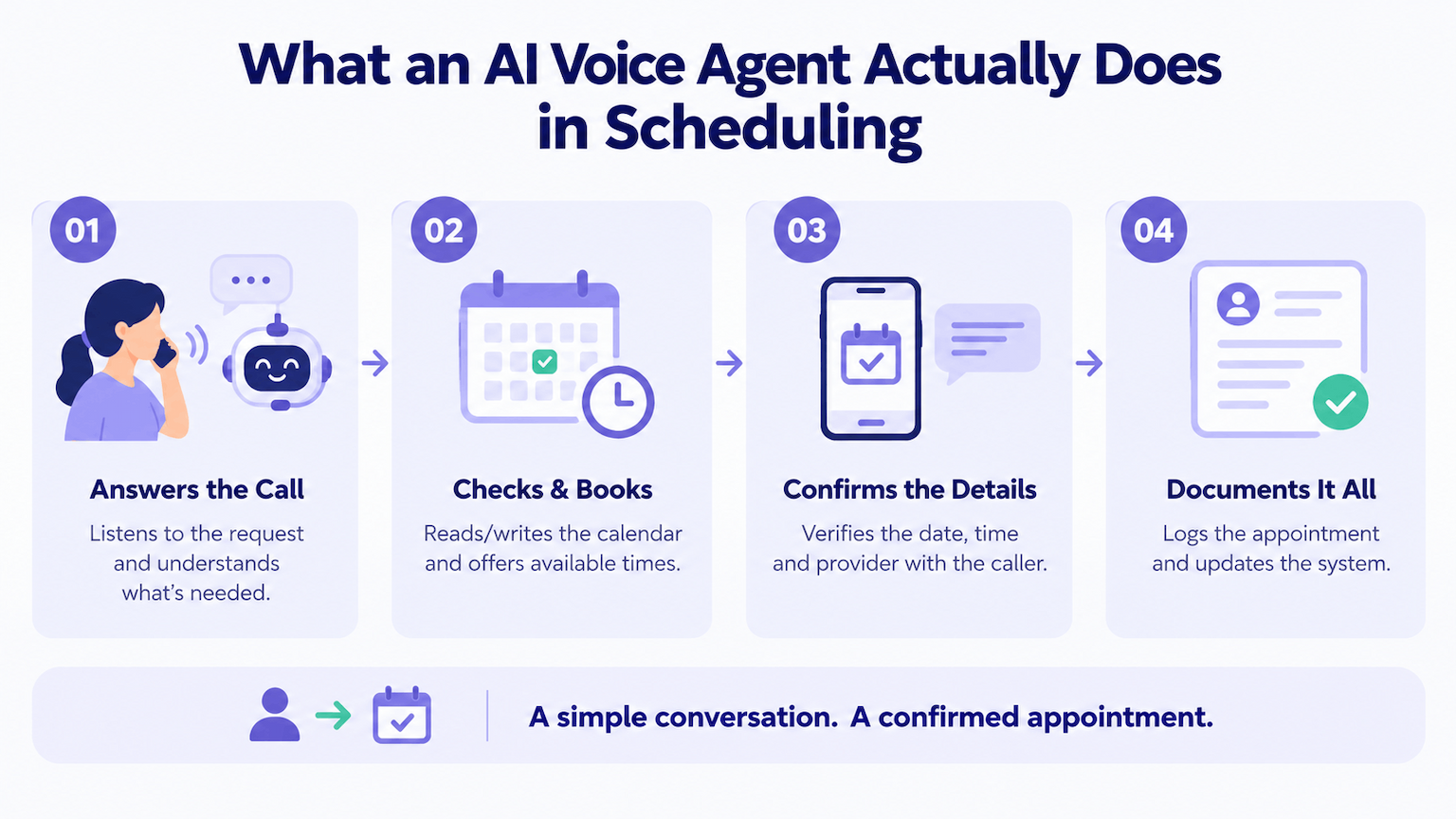
An AI voice agent for appointment scheduling doesn't simply read out the available times. It answers the phone, listens to a request, reads/writes the calendar, verifies back to the caller, and documents it all. This kind of simple, repeatable conversation is the core of Maica's platform, designed to support this kind of dialog across a variety of service industries: healthcare, hospitality, HR, retail, and education.
The Four Core Workflows
- Booking
- Confirmation
- Rescheduling
- Reminders
AI appointment booking is easy for existing and new clients. First, the "agent" asks what service type and preferred time (time window) it's looking for and then quotes legit slots. A confirmation closes the loop, re-stating date, time and provider once more. Cancellation and relocation are dealt with by rescheduling. Reminders for customers prior to appointment are requested to respond.
But what does automation mean? It's not an agent-on-keypad option. It works in the scheduling system, remembers interrupted/fixed requests, and understands natural speech. If it cannot complete the task, it notifies the user and transfers the call with context.
In this case, 24/7 coverage is vital. 24/7 appointment booking means a customer who calls at 9 p.m. gets a confirmed slot instead of voicemail. Customers have an appointment booked instead of getting the runaround and into voicemail. Analysts see the demand: Mordor Intelligence estimates the AI patient scheduling software market at about $99 million in 2026, growing to roughly $311 million by 2031 at a 25.7 percent annual rate. Note that those numbers are directional; the estimates differ among research firms.
The Escalation Boundary: What AI Should Never Handle
AI schedules. It does not diagnose, triage, or advise. This line ensures that all industries have secured AI appointment scheduling and should be part of regulation around the system and not left to the model's judgment. Skin care advice for scalp disease is not the concern of a salon booking agent. A home service agent should not assess the dangers of a gas leak. A clinic agent should not assess the severity of symptoms.
This boundary also protects the reputation and legal status of the business. An agent may not be allowed to ask the severity of an incident. Transcripts should be brief with periodic check-ins to learn how the agent is leveling-credit.
When judgment calls require trained professionals, critical context, or regulated expertise, humans are the way to go. This is true whether the question is one of safety, technical expertise, or clinical insight. A scheduling agent has no visibility into those decisions.
A Simple Escalation Taxonomy
Ordinary administrative requests stay with the agent. Questions requiring professional judgment are transferred to an appropriate staff member. Emergencies (urgent request or safety concern) result in explicit instructions to call appropriate services and a live hand-off.
Emergency detection should favor escalation. A false positive is but a minute of staff time, a missed alarm costs far more. With explicit tiers, verification, and a handoff of the caller information and a summary of the voice call to the human, you have no repetition and build confidence in voice AI and service businesses.
Designing the Booking Workflow
The Process Used is the Uniform Booking Process. Each step is pass/fail, and failure leads to a person, not a guess.
The first step is to identify the person with business-specific information such as name, phone number, and any account reference. Secondly, check the calendar for availability (provider, location, and time for appointment) live. Third, verify the service type with the time slot, as a first-time consult and a return visit are rarely measured in the same increment. Fourth, note any payment/eligibility/deposit requirements customers must meet that may be phrased as an exception to staff by the business.
Edge cases deserve rules too. If a request is made outside the common hours or requires approval, the staff must know that there is a duplicate record. The front desk agrees to a short list of these exceptions pre-launch, which prevents the bulk of early frustration.
This cannot be done without write access to the scheduling system. An agent that only considers availability creates another assignment for the staff. The Maica team put it into practice: AI steers the conversation, but critical calculations, pricing, and recommendations are driven by deterministic logic. Appointment confirmation automation is only as good as the data it writes back.
Confirmation, Rescheduling, and Reminders
Booking is half the battle, attendance depends on what happens afterward. These are followed up with automated appointment confirmation calls or emails to the consumer prior to the appointment, simply asking the consumer to confirm (yes or no) with a repetition in the calendar. Usually three steps: a call confirming a few days ahead, a reminder on the day of the visit, and a followup when no response comes from the consumer.
1. Rescheduling and Waitlist Recovery
Reschedule automatically if a customer is not available. The agent's first action is to suggest alternatives, immediately followed by reaching out to a waitlist of customers that have opted to be notified. A cancelled Tuesday slot can be refilled within minutes instead of staying empty.
There is something to be said for customer preference. Some want an online link to reschedule, some want a phone call. You should always be willing to get on a waitlist.
2. Do Reminders Work?
There is good evidence supporting it. For a reminder trial, Cochrane review says that attendance was at a rate of 67.8 percent with no reminders, 78.6 percent with text messages, and 80.3 percent for reminder phone calls. Evidence was rated as low to moderate quality, suggesting that individual results would depend on the context of a specific business. Most recently, a trial at Penn Medicine found that automated IVR calls and text reminders saved high-risk patients from being absent 1.7%. The same holds true for any appointment-dependent business: A well-timed call is better than passive reminders.
Integration and Compliance Requirements
In some industries, scheduling data is sensitive and private. Workflow & compliance: Automated appointment scheduling. The questions are the same, but requirements vary by industry and jurisdiction:
On the integration front, ask how the agent reads/writes appointments. Most service businesses go with standard connections to Google, Outlook, or Apple Calendar. If your practice has an EHR/practice management system, then standards-based connections may be more efficient than custom API work. Make sure your system supports this before you sign up!
If you're contracting with a vendor to manage your personal data, data protection laws will require that they have a written agreement with you on how the data will be stored, processed, and deleted. Ask for selective storage of recordings and transcripts, encryption in transit and at rest, logging of usage for archival purposes, etc. Also ask about data residency options and sub-processor details, as recordings and transcripts can traverse borders. In healthcare, that means a HIPAA business associate agreement, but the idea of documenting responsibility is applicable to any data-rich industry.
What to Look for in AI Appointment Scheduling Software
Compare AI appointment scheduling software for clinics, salons, home services, or professional practices by trying a live demo with your own contact scenarios.
Latency comes first. A study of ten languages found that speakers in all of them minimize silence between conversational turns, so an agent that pauses for seconds feels broken. Second, write access. The agent would have to cancel, schedule, move and read too.
Third, review the taxonomy around escalation and ask the vendor to show a judgment question being handed off. Fourth, make sure that live calls can be received in your customer's language(s). Fifth, probe the degree of calendar integration, and any CRM- or practice management-related integration, and question how failed writes are reported to staff. Request sample calls and, where possible, reference customers, because demos can be tuned to flatter a product.
Cost and Implementation Expectations
Pricing is based on calls, location, and integrations, so offer up a real list of calls you'll make per month for accurate pricing requests. The scheduling software is the largest setup effort variable. Simple booking and reminder flow can be done in weeks, but authorization of more complex calendar/practice management write access is slower.
If you've already experimented with the engine in other scenarios, rollout is a breeze. The same logic applies to Maica for viewings, restaurant bookings, interviews, and clinic bookings. Start at one location and track three things: no shows, after hours bookings, and questions otherwise going to staff.
Also consider staff time. Have an owner for the escalation queue who can review transcripts to fine-tune protocols in the early weeks to keep the service evolving.
Concluding Note
Businesses don't need AI that makes decisions that a human should be making. They need AI to answer calls, schedule appointments accordingly, follow up on confirmations, refill canceled appointments, and refer to a human for any decision requiring judgment. Thus, AI appointment scheduling reduces front-desk work and no-shows without introducing any extremes. This is the sweet spot for voice agents because scheduling is limited, repetitive, and quantifiable (and also easier for auditing results).
The path is clear: First, establish your escalation boundaries, then give the agent write access, then having conformance before deployment (including getting confirmation and waitlist recovery as well) in-flow. Start with a pilot using vendor claims and market numbers. Choose one location, service type, and workflow and then scale when you have the escalation and no-show data to do so.
Frequently Asked Questions
What Is AI Appointment Scheduling?
AI voice agent software to respond to inbound calls, make reservations off live availability, confirm visits, reschedule, and send reminders. Removes the burden of scheduling from staff and allows them to focus on customers who need a person.
How Is an AI Appointment Scheduling Agent Different From an IVR Menu?
An IVR menu confines callers to keypad options. An AI agent hears natural speech, deals with interjections and corrections, and executes in the scheduling ecosystem. And if it can't handle it, it hands off the call with context.
Which Industries Benefit Most From AI Appointment Scheduling?
All appointment-driven businesses: salons, spas, home services, pro services, reservation-only restaurants, HR teams filling interview slots, and dentists and clinics. They all share high call volumes with repeatable workflows to book appointments.
Can AI Scheduling Handle After-Hours Bookings?
Yes. A customer who calls at 9 p.m. can get a confirmed slot instead of voicemail, capturing bookings that might otherwise go to a competitor.
What Should AI Never Handle in a Scheduling Conversation?
Judgment calls requiring professional expertise. A salon agent should not advise on scalp conditions, a home services agent should not assess dangerous gas leaks, and a clinic agent should not evaluate symptom severity. These requests should go to qualified staff.
About the author

Deepak Dutta
Content Strategist
Deepak Dutta is a tech-focused content strategist and writer with 9+ years of experience crafting content for emerging technologies and digital products. With deep expertise in Blockchain, Web3, AI, Mobile apps, Web apps and Game development, he creates engaging, SEO-focused content that simplifies complex ideas, strengthens brand authority, and connects technology companies with their target audience.